
多节点测试#
多节点 CI 旨在测试超大规模模型的分布式场景,例如:跨多个节点的解耦式预填充(disaggregated_prefill)多数据并行(DP)等。
工作原理#
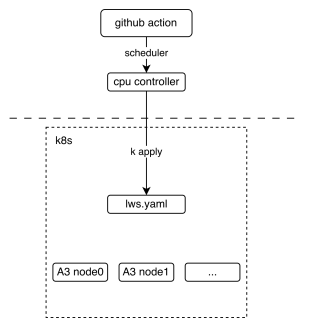
下图展示了多节点 CI 机制的基本部署视图,说明了 GitHub Action 如何与 lws(一种 Kubernetes CRD 资源)交互。
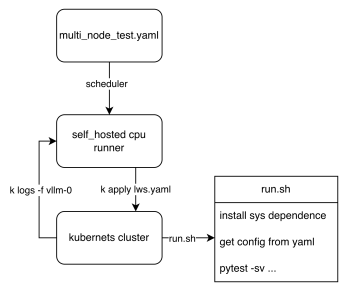
From the workflow perspective, we can see how the final test script is executed, The key point is that the shared files tests/e2e/nightly/multi_node/scripts/lws.yaml.jinja2 and tests/e2e/nightly/multi_node/scripts/run.sh define the cluster template and pod entry script. Each node executes different logic according to the LWS_WORKER_INDEX environment variable, so that multiple nodes can form a distributed cluster to perform tasks. run.sh selects the pytest entrypoint from the config path: internal DP configs use internal_dp/scripts/test_multi_node.py, while external DP configs use external_dp/scripts/test_external_dp.py.
如何贡献#
上传自定义权重
如果您需要自定义权重,例如为 DeepSeek-V3 量化了 w8a8 权重并希望在 CI 上运行,欢迎将权重上传至 ModelScope 的 vllm-ascend 组织。如果您没有上传权限,请联系 @Potabk。
添加配置文件
For the normal internal DP multi-node flow, add the config yaml to
tests/e2e/nightly/multi_node/internal_dp/config/, likeDeepSeek-V3.yaml. External DP cases use the separatetests/e2e/nightly/multi_node/external_dp/config/directory and should pass that directory throughconfig_base_pathin workflow orCONFIG_BASE_PATHlocally.假设您有 2个节点 运行 1P1D 配置(1个预填充器 + 1个解码器):
您可以添加一个类似这样的配置文件:
test_name: "test DeepSeek-V3 disaggregated_prefill"
# the model being tested
model: "vllm-ascend/DeepSeek-V3-W8A8"
# how large the cluster is
num_nodes: 2
npu_per_node: 16
# All env vars you need should add it here
env_common: &env_common
  VLLM_USE_MODELSCOPE: true
  OMP_PROC_BIND: false
  OMP_NUM_THREADS: 100
  HCCL_BUFFSIZE: 1024
  SERVER_PORT: 8080
disaggregated_prefill:
  enabled: true
  # node index(a list) which meet all the conditions:
  #  - prefiller
  #  - no headless(have api server)
  prefiller_host_index: [0]
  # node index(a list) which meet all the conditions:
  #  - decoder
  decoder_host_index: [1]

# Add each node's vllm serve cli command just like you run locally
# Add each node's individual envs like follow
deployment:
- name: prefiller node # optional: just for description, not used in code
  envs:
    <<: *env_common
    VLLM_ASCEND_ENABLE_FLASHCOMM1: 1
    # Continue to add other envs if needed
  server_cmd: >
    vllm serve ...
- name: decoder node # optional: just for description, not used in code
  envs:
    <<: *env_common
    VLLM_ASCEND_ENABLE_FLASHCOMM1: 1
    # Continue to add other envs if needed
  server_cmd: >
    vllm serve ...
benchmarks:
  perf:
    # fill with performance test kwargs
  acc:
    # fill with accuracy test kwargs
将测试用例添加到夜间工作流
Currently, the multi-node test workflow is defined in .github/workflows/schedule_nightly_test_a3.yaml.
```yaml
multi-node-tests:
  name: multi-node
  if: always() && (github.event_name == 'schedule' || github.event_name == 'workflow_dispatch')
  strategy:
    fail-fast: false
    max-parallel: 1
    matrix:
      test_config:
        - name: multi-node-deepseek-pd
          config_file_path: DeepSeek-V3.yaml
          size: 2
        - name: multi-node-qwen3-dp
          config_file_path: Qwen3-235B-A22B.yaml
          size: 2
        - name: GLM5_1-W8A8-EP-external
          config_file_path: GLM5_1-W8A8-EP-external.yaml
          config_base_path: tests/e2e/nightly/multi_node/external_dp/config/
          size: 4
  uses: ./.github/workflows/_e2e_nightly_multi_node.yaml
  with:
    soc_version: a3
    runner: linux-aarch64-a3-0
    image: 'swr.cn-southwest-2.myhuaweicloud.com/base_image/ascend-ci/vllm-ascend:nightly-a3'
    replicas: 1
    size: ${{ matrix.test_config.size }}
    config_file_path: ${{ matrix.test_config.config_file_path }}
    config_base_path: ${{ matrix.test_config.config_base_path || '' }}
    name: ${{ matrix.test_config.name }}
  secrets:
    KUBECONFIG_B64: ${{ secrets.KUBECONFIG_B64 }}
```
The matrix above defines all the parameters required to add a multi-machine use
case. The parameters worth noting are size, config_file_path, and
config_base_path. size defines the number of nodes required for your use
case. config_file_path is the yaml file name, and config_base_path tells the
loader which config directory to use. For internal DP cases, use an empty
config_base_path so the loader uses its default internal DP config directory.
For external DP cases, set it to
tests/e2e/nightly/multi_node/external_dp/config/.
本地运行多节点测试#
1.使用 Kubernetes#
本节假定您本地已有一个 Kubernetes NPU 集群环境。这样您就可以轻松一键启动我们的测试。
步骤 1.安装 LWS CRD 资源
步骤 2.按需部署以下
lws.yaml文件apiVersion: leaderworkerset.x-k8s.io/v1 kind: LeaderWorkerSet metadata: name: test-server namespace: vllm-project spec: replicas: 1 leaderWorkerTemplate: size: 2 restartPolicy: None leaderTemplate: metadata: labels: role: leader spec: containers: - name: vllm-leader imagePullPolicy: Always image: swr.cn-southwest-2.myhuaweicloud.com/base_image/ascend-ci/vllm-ascend:nightly-a3 env: - name: CONFIG_YAML_PATH value: DeepSeek-V3.yaml - name: CONFIG_BASE_PATH value: tests/e2e/nightly/multi_node/internal_dp/config/ - name: WORKSPACE value: "/vllm-workspace" - name: FAIL_TAG value: FAIL_TAG command: - sh - -c - | bash /vllm-workspace/vllm-ascend/tests/e2e/nightly/multi_node/scripts/run.sh resources: limits: huawei.com/ascend-1980: 16 memory: 512Gi ephemeral-storage: 100Gi requests: huawei.com/ascend-1980: 16 memory: 512Gi ephemeral-storage: 100Gi cpu: 125 ports: - containerPort: 8080 # readinessProbe: # tcpSocket: # port: 8080 # initialDelaySeconds: 15 # periodSeconds: 10 volumeMounts: - mountPath: /root/.cache name: shared-volume - mountPath: /usr/local/Ascend/driver/tools name: driver-tools - mountPath: /dev/shm name: dshm volumes: - name: dshm emptyDir: medium: Memory sizeLimit: 15Gi - name: shared-volume persistentVolumeClaim: claimName: nv-action-vllm-benchmarks-v2 - name: driver-tools hostPath: path: /usr/local/Ascend/driver/tools workerTemplate: spec: containers: - name: vllm-worker imagePullPolicy: Always image: swr.cn-southwest-2.myhuaweicloud.com/base_image/ascend-ci/vllm-ascend:nightly-a3 env: - name: CONFIG_YAML_PATH value: DeepSeek-V3.yaml - name: CONFIG_BASE_PATH value: tests/e2e/nightly/multi_node/internal_dp/config/ - name: WORKSPACE value: "/vllm-workspace" - name: FAIL_TAG value: FAIL_TAG command: - sh - -c - | bash /vllm-workspace/vllm-ascend/tests/e2e/nightly/multi_node/scripts/run.sh resources: limits: huawei.com/ascend-1980: 16 memory: 512Gi ephemeral-storage: 100Gi requests: huawei.com/ascend-1980: 16 ephemeral-storage: 100Gi cpu: 125 volumeMounts: - mountPath: /root/.cache name: shared-volume - mountPath: /usr/local/Ascend/driver/tools name: driver-tools - mountPath: /dev/shm name: dshm volumes: - name: dshm emptyDir: medium: Memory sizeLimit: 15Gi - name: shared-volume persistentVolumeClaim: claimName: nv-action-vllm-benchmarks-v2 - name: driver-tools hostPath: path: /usr/local/Ascend/driver/tools --- apiVersion: v1 kind: Service metadata: name: vllm-leader namespace: vllm-project spec: ports: - name: http port: 8080 protocol: TCP targetPort: 8080 selector: leaderworkerset.sigs.k8s.io/name: vllm role: leader type: ClusterIP
kubectl apply -f lws.yaml
验证 Pod 状态:
kubectl get pods -n vllm-project
应该会得到类似以下的输出:
NAME       READY   STATUS    RESTARTS   AGE
vllm-0     1/1     Running   0          2s
vllm-0-1   1/1     Running   0          2s
验证分布式推理是否正常工作:
kubectl logs -f vllm-0 -n vllm-project
应该会得到类似以下的结果:
INFO 12-30 11:00:57 [__init__.py:43] Available plugins for group vllm.platform_plugins:
INFO 12-30 11:00:57 [__init__.py:45] - ascend -> vllm_ascend:register
INFO 12-30 11:00:57 [__init__.py:48] All plugins in this group will be loaded. Set `VLLM_PLUGINS` to control which plugins to load.
INFO 12-30 11:00:57 [__init__.py:217] Platform plugin ascend is activated
INFO 12-30 11:00:57 [importing.py:68] Triton not installed or not compatible; certain GPU-related functions will not be available.
================================================================================================== test session starts ===================================================================================================
platform linux -- Python 3.11.13, pytest-8.4.2, pluggy-1.6.0 -- /usr/local/python3.11.13/bin/python3
cachedir: .pytest_cache
rootdir: /vllm-workspace/vllm-ascend
configfile: pyproject.toml
plugins: cov-7.0.0, asyncio-1.3.0, mock-3.15.1, anyio-4.12.0
asyncio: mode=Mode.STRICT, debug=False, asyncio_default_fixture_loop_scope=None, asyncio_default_test_loop_scope=function
collected 1 item

tests/e2e/nightly/multi_node/internal_dp/scripts/test_multi_node.py::test_multi_node [2025-12-30 11:01:01] INFO multi_node_config.py:294: Loading config yaml: tests/e2e/nightly/multi_node/internal_dp/config/DeepSeek-V3.yaml
[2025-12-30 11:01:01] INFO multi_node_config.py:348: Resolving cluster IPs via DNS...
[2025-12-30 11:01:01] INFO multi_node_config.py:212: Node 0 envs: {'VLLM_USE_MODELSCOPE': 'True', 'OMP_PROC_BIND': 'False', 'OMP_NUM_THREADS': '100', 'HCCL_BUFFSIZE': '1024', 'SERVER_PORT': '8080', 'NUMEXPR_MAX_THREADS': '128', 'DISAGGREGATED_PREFILL_PROXY_SCRIPT': 'examples/disaggregated_prefill_v1/load_balance_proxy_server_example.py', 'HCCL_IF_IP': '10.0.0.102', 'HCCL_SOCKET_IFNAME': 'eth0', 'GLOO_SOCKET_IFNAME': 'eth0', 'TP_SOCKET_IFNAME': 'eth0', 'LOCAL_IP': '10.0.0.102', 'NIC_NAME': 'eth0', 'MASTER_IP': '10.0.0.102'}
[2025-12-30 11:01:01] INFO multi_node_config.py:159: Launching proxy: python examples/disaggregated_prefill_v1/load_balance_proxy_server_example.py --host 10.0.0.102 --port 6000 --prefiller-hosts 10.0.0.102 --prefiller-ports 8080 --decoder-hosts 10.0.0.138 --decoder-ports 8080
[2025-12-30 11:01:01] INFO conftest.py:107: Starting server with command: vllm serve vllm-ascend/DeepSeek-V3-W8A8 --host 0.0.0.0 --port 8080 --data-parallel-size 2 --data-parallel-size-local 2 --tensor-parallel-size 8 --seed 1024 --enforce-eager --enable-expert-parallel --max-num-seqs 16 --max-model-len 8192 --max-num-batched-tokens 8192 --quantization ascend --trust-remote-code --no-enable-prefix-caching --gpu-memory-utilization 0.9 --kv-transfer-config {"kv_connector": "MooncakeConnectorV1", "kv_role": "kv_producer", "kv_port": "30000", "engine_id": "0", "kv_connector_extra_config": {
        "prefill": {
                "dp_size": 2,
                "tp_size": 8
        },
        "decode": {
                "dp_size": 2,
                "tp_size": 8
        }
    }
}
2. Test without Kubernetes#
The same tests/e2e/nightly/multi_node/scripts/run.sh entrypoint can be used
on prepared bare-metal or container hosts. Without LWS, set the values that
Kubernetes normally injects yourself:
cluster_hostsin the config yaml, using IPs reachable from every node.LWS_WORKER_INDEXon each node, starting from0.CONFIG_YAML_PATHas the config file name andCONFIG_BASE_PATHas the config directory.
Use the host NIC IPs that can reach each other, for example addresses shown by
ip addr or ifconfig on the active network interface. Do not use per-host
Docker bridge addresses such as 172.17.0.1, because each host has its own
local bridge.
Local cluster_hosts edits should be removed before submitting a PR unless the
hosts are part of a committed test environment.
2.1 Internal DP local run#
2.1.1 Add cluster hosts#
Edit the internal DP config you want to run, for example:
tests/e2e/nightly/multi_node/internal_dp/config/DeepSeek-V3.yaml
Add cluster_hosts as a top-level field, for example near num_nodes and
npu_per_node:
cluster_hosts:
  - "172.22.0.xxx"
  - "172.22.0.xxx"
2.1.2 Prepare the environment#
Install vllm-ascend development dependencies on every cluster host:
cd /vllm-workspace/vllm-ascend
python3 -m pip install -r requirements-dev.txt
Install AISBench on the first host, which is the node with
LWS_WORKER_INDEX=0:
export AIS_BENCH_TAG="v3.1-20260330-master"
export AIS_BENCH_URL="https://github.com/AISBench/benchmark.git"
export BENCHMARK_HOME=/vllm-workspace/vllm-ascend/benchmark

git clone -b ${AIS_BENCH_TAG} --depth 1 ${AIS_BENCH_URL} $BENCHMARK_HOME
cd $BENCHMARK_HOME
pip install -e . -r requirements/api.txt -r requirements/extra.txt
If your local image already contains the model, benchmark data, Ascend runtime, and AISBench, you only need the run-time exports in the next step.
2.1.3 Start each node#
Run the script on each node separately. Start worker nodes first, then start node 0.
On node 1:
export WORKSPACE=/vllm-workspace
export IS_PR_TEST=false
export CONFIG_YAML_PATH=DeepSeek-V3.yaml
export CONFIG_BASE_PATH=tests/e2e/nightly/multi_node/internal_dp/config/
export LWS_WORKER_INDEX=1

cd $WORKSPACE/vllm-ascend
bash tests/e2e/nightly/multi_node/scripts/run.sh
On node 0:
export WORKSPACE=/vllm-workspace
export IS_PR_TEST=false
export CONFIG_YAML_PATH=DeepSeek-V3.yaml
export CONFIG_BASE_PATH=tests/e2e/nightly/multi_node/internal_dp/config/
export LWS_WORKER_INDEX=0

cd $WORKSPACE/vllm-ascend
bash tests/e2e/nightly/multi_node/scripts/run.sh
Internal DP logs are mainly printed to the terminal running run.sh. When
LOG_PREFIX is set, the shared script also backs up Ascend logs to:
$LOG_PREFIX/node_<LWS_WORKER_INDEX>_plogs/
2.2 External DP local run#
2.2.1 Add cluster hosts#
Edit the external DP config you want to run. For example:
tests/e2e/nightly/multi_node/external_dp/config/GLM5_1-W8A8-EP-external.yaml
Add cluster_hosts as a top-level field, for example near num_nodes and
npu_per_node:
cluster_hosts:
  - "172.22.0.xxx"
  - "172.22.0.xxx"
  - "172.22.0.xxx"
  - "172.22.0.xxx"
2.2.2 Prepare the environment#
Install vllm-ascend development dependencies on every cluster host:
cd /vllm-workspace/vllm-ascend
python3 -m pip install -r requirements-dev.txt
Install AISBench on node 0:
export AIS_BENCH_TAG="v3.1-20260330-master"
export AIS_BENCH_URL="https://github.com/AISBench/benchmark.git"
export BENCHMARK_HOME=/vllm-workspace/vllm-ascend/benchmark

git clone -b ${AIS_BENCH_TAG} --depth 1 ${AIS_BENCH_URL} $BENCHMARK_HOME
cd $BENCHMARK_HOME
pip install -e . -r requirements/api.txt -r requirements/extra.txt
If your local image already contains the model, benchmark data, Ascend runtime, and AISBench, you only need the run-time exports in the next step.
2.2.3 Start each node#
External DP uses the same shared run.sh. Set CONFIG_BASE_PATH to the
external DP config directory so the script chooses
external_dp/scripts/test_external_dp.py.
Then start non-master nodes first, and start node 0 last. The following example
uses GLM5_1-W8A8-EP-external.yaml, which is a 4-node disaggregated prefill
case.
On node 1, node 2, and node 3, set the matching LWS_WORKER_INDEX:
export WORKSPACE=/vllm-workspace
export IS_PR_TEST=false
export CONFIG_BASE_PATH=tests/e2e/nightly/multi_node/external_dp/config/
export CONFIG_YAML_PATH=GLM5_1-W8A8-EP-external.yaml
export LWS_WORKER_INDEX=1  # Use 2 on node 2, and 3 on node 3.

cd $WORKSPACE/vllm-ascend
bash tests/e2e/nightly/multi_node/scripts/run.sh
On node 0:
export WORKSPACE=/vllm-workspace
export IS_PR_TEST=false
export CONFIG_BASE_PATH=tests/e2e/nightly/multi_node/external_dp/config/
export CONFIG_YAML_PATH=GLM5_1-W8A8-EP-external.yaml
export LWS_WORKER_INDEX=0

cd $WORKSPACE/vllm-ascend
bash tests/e2e/nightly/multi_node/scripts/run.sh
For GLM5_1-W8A8-EP-external.yaml, node 0 and node 1 start prefiller ranks,
node 2 and node 3 start decoder ranks, and node 0 also starts the proxy and
benchmark.
2.2.4 Read logs while the test is running#
The terminal running run.sh prints pytest orchestration logs. For external DP,
AISBench output is also printed on node 0, while rank and proxy stdout/stderr
are written to EXTERNAL_DP_LOG_DIR. The default layout is:
/tmp/external_dp_logs/
  node-0/
    rank-0.log
    rank-1.log
    proxy.log
  node-1/
    rank-0.log
    rank-1.log
The first line of each rank log records the exact command and environment used
to start that rank. proxy.log exists only on the configured proxy node,
usually node 0.
Use a separate log directory when running multiple local experiments:
export EXTERNAL_DP_LOG_DIR=/tmp/external_dp_logs_pd_local
To watch logs in real time, run these commands in another terminal on the corresponding node:
# node 0: ranks and proxy
tail -F /tmp/external_dp_logs/node-0/rank-0.log \
        /tmp/external_dp_logs/node-0/rank-1.log \
        /tmp/external_dp_logs/node-0/proxy.log

# node 1: ranks
tail -F /tmp/external_dp_logs/node-1/rank-0.log \
        /tmp/external_dp_logs/node-1/rank-1.log