
Multi-round QA#
Benchmarking vLLM Production Stack Performance with multi-round QA
Overview#
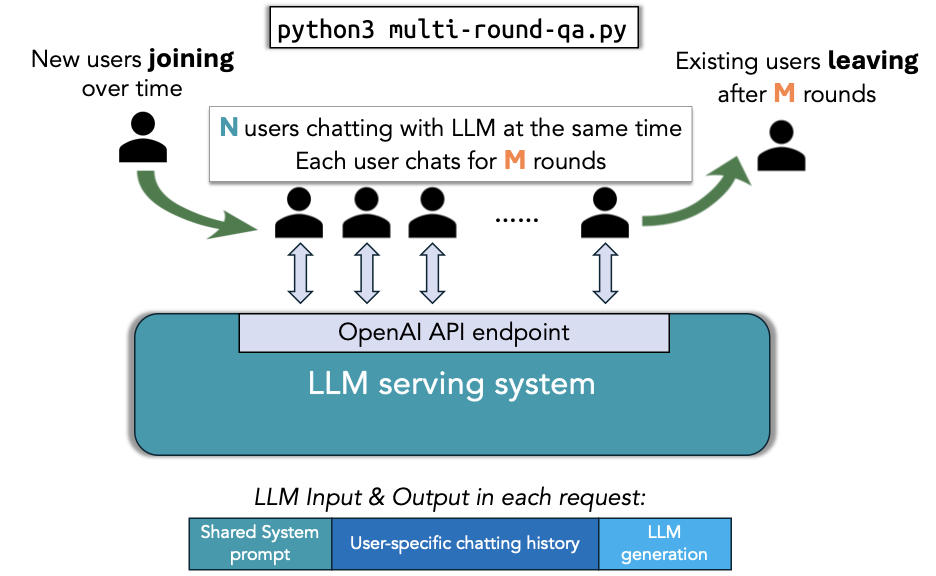
This repository contains benchmarking tools for evaluating vLLM Production Stack’s performance (e.g., latency, throughput). The initial focus of this benchmark is on the multi-round QA (Question Answering) use case. The script multi-round-qa.py simulates multiple users interacting with a language model concurrently for multiple rounds, allowing you to analyze the serving engine’s throughput and latency.
The overall workflow of this script is shown below:
Setup#
Install the required packages needed to run the benchmark:
pip install -r requirements.txt
Running benchmarks#
To run the multi-round QA benchmark, use the following example command:
python3 multi-round-qa.py \
    --num-users 10 \
    --num-rounds 5 \
    --qps 0.5 \
    --shared-system-prompt 1000 \
    --user-history-prompt 2000 \
    --answer-len 100 \
    --model meta-llama/Llama-3.1-8B-Instruct \
    --base-url http://localhost:30080/v1
Use Ctrl-C to terminate the benchmark at any time, and the script will write each request’s detailed stats to summary.csv.
Note: The above command requires a serving engine with the meta-llama/Llama-3.1-8B-Instruct model served locally at http://localhost:30080/v1. Here’s an example command to launch the serving engine with vLLM Production Stack:
helm repo add vllm https://vllm-project.github.io/production-stack
helm install vllm vllm/vllm-stack -f model.yaml
Then, perform port-forwarding with the following command:
kubectl port-forward svc/vllm-router-service 30080:80
Explanation of the arguments#
Configuring the workload#
--num-users <int>: The maximum number of concurrent users in the system (N in the above figure).--num-rounds <int>: The number of rounds per user (M in the above figure).--qps <float>: The overall queries per second (QPS) rate for the system.--shared-system-prompt <int>: Length of the system prompt shared across all users (in tokens).--user-history-prompt <int>: Length of the user-specific context (simulating existing chat history) (in tokens).--answer-len <int>: Length of the answer expected (in tokens).--init-user-id <int>: The initial user ID to start the benchmark (default = 0). This is useful when you want to resume the benchmark from a specific user ID or avoid serving engine caching the request from previous runs.--request-with-user-id: If this option is present, the script will include the user ID in the request header.--sharegpt: If this option is present, the script will use ShareGPT workload instead of dummy context.
Note
If you use the ShareGPT dataset, the length of the expected answer (in tokens) will be determined by the minimum value between the dataset response and --answer-len. You also need to follow the instructions in ShareGPT Datasets first.
Configuring the serving engine connection#
--model <str>: The model name (e.g.,mistralai/Mistral-7B-Instruct-v0.2).--base-url <str>: The URL endpoint for the language model server.
Configuring the experiment (Optional)#
--output <str>: The CSV file to dump the detailed stats for each query (default =summary.csv).--log-interval <float>: Time between each performance summary log in seconds (default = 30).--time <float>: Total time to run the experiment (default = forever).
Processing previous outputs only (Optional)#
--process-summary <filename>: If this option is present, the script will only process the existing output CSV and print out the summary without running any experiment.
Benchmark Metrics#
Queries Per Second (QPS): The average number of queries processed by the model per second.
Average Prompt Throughput: Tokens generated in the prompt per second.
Average Generation Throughput: Tokens generated as part of the response per second.
Average TTFT (Time to First Token): Average time taken for the model to generate the first token of a response.