
Installation#
Architecture#
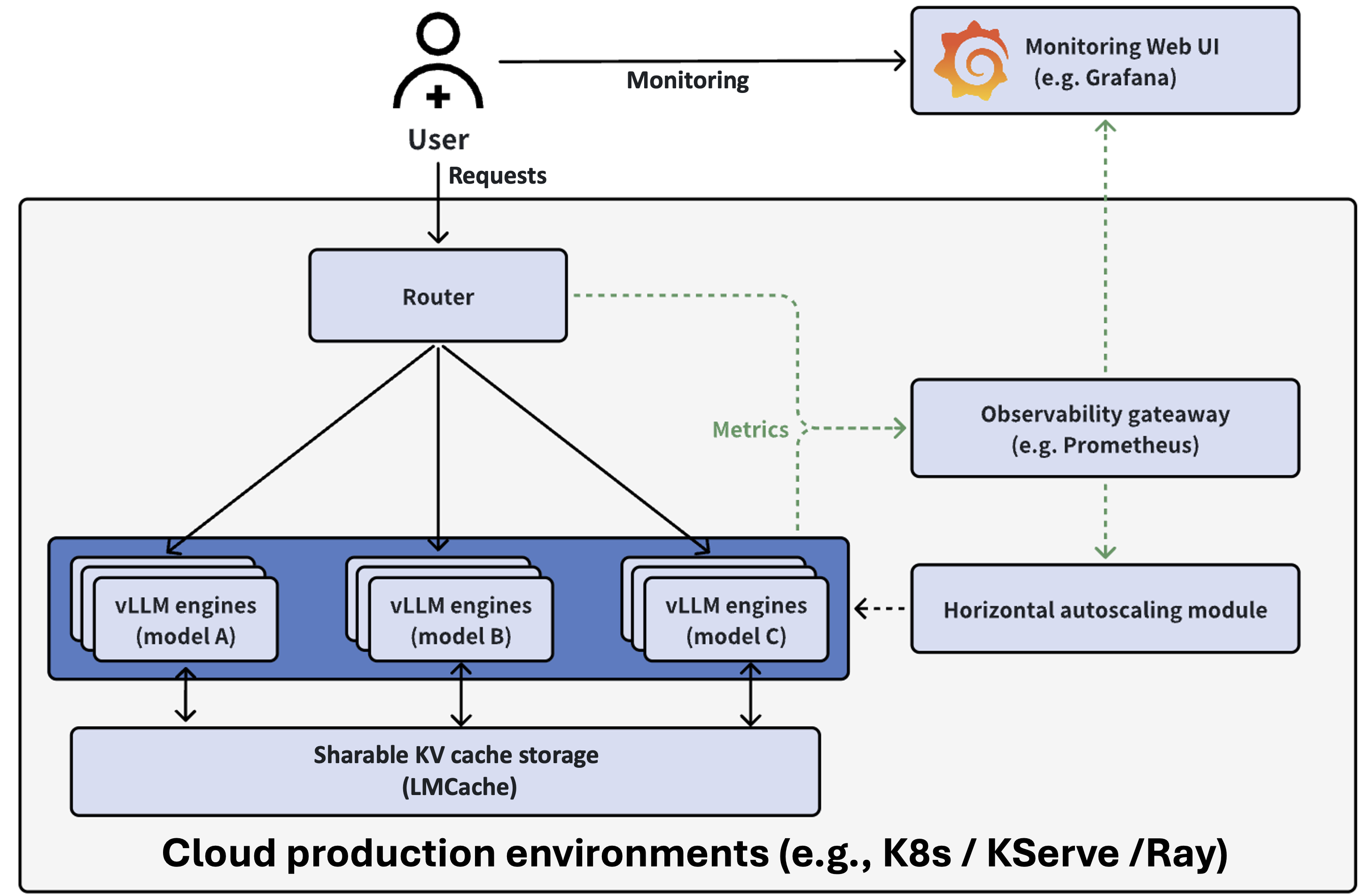
The stack is set up using Helm, and contains the following key parts:
Serving engine: The vLLM engines that run different LLMs
Request router: Directs requests to appropriate backends based on routing keys or session IDs to maximize KV cache reuse.
Observability stack: monitors the metrics of the backends through Prometheus and Grafana.
Prerequisites#
A running Kubernetes (K8s) environment with GPUs
Run
cd utils&&bash install-minikube-cluster.shOr follow our tutorial
Deployment#
vLLM Production Stack can be deployed via helm charts. Clone the repo to local and execute the following commands for a minimal deployment:
git clone https://github.com/vllm-project/production-stack.git
cd production-stack/
helm repo add vllm https://vllm-project.github.io/production-stack
helm install vllm vllm/vllm-stack -f tutorials/assets/values-01-minimal-example.yaml
The deployed stack provides the same OpenAI API interface as vLLM, and can be accessed through kubernetes service.
To validate the installation and and send query to the stack, refer to this example.
Uninstallation#
To uninstall the stack, run:
helm uninstall vllm