Adding an Omni-Modality Model
This guide walks through the process of adding a new multi-stage model to vLLM-Omni, using Qwen3-Omni as a comprehensive example. Qwen3-Omni is a multi-stage omni-modality model that demonstrates the full capabilities of vLLM-Omni's architecture.
Table of Contents
- Overview
- Directory Structure
- Step-by-Step Implementation
- Key Components
- Model Registration
- Stage Configuration
- Stage Input Processors
- Testing
- Adding a Model Recipe
- Summary
Overview
vLLM-Omni supports multi-stage model architectures where different stages can run on different devices and process different modalities. The Qwen3-Omni model exemplifies this with three stages:
- Thinker Stage: Multimodal understanding (text + audio + video) → text generation
- Talker Stage: Text embeddings → RVQ codec codes
- Code2Wav Stage: RVQ codes → audio waveform
Each stage is implemented as a separate model class that can be configured independently.
Directory Structure
When adding a new model, you'll need to create the following structure:
vllm_omni/model_executor/models/
└── your_model_name/              # Model directory (e.g., qwen3_omni)
    ├── __init__.py               # Exports main model class
    ├── your_model.py             # Main unified model class
    ├── your_model_stage1_implementation.py      # Stage 1 implementation (e.g., thinker)
    ├── your_model_stage2_implementation.py      # Stage 2 implementation (e.g., talker)
    └── your_model_stage3_implementation.py      # Stage 3 implementation (e.g., code2wav)
    └── ... maybe other stage implementations

vllm_omni/model_executor/stage_input_processors/
└── your_model_name.py            # Stage transition processors

vllm_omni/model_executor/stage_configs/
└── your_model_name.yaml          # Stage configuration file
Step-by-Step Implementation
Step 1: Create the Model Directory
Create a new directory under vllm_omni/model_executor/models/
Step 2: Implement Stage Components
For Qwen3-Omni, we have three stage components:
2.1 Thinker Stage (qwen3_omni_moe_thinker.py)
The thinker stage handles multimodal understanding. Key features:
- Inherits from base Qwen3 MoE model in vLLM, using vLLM fused ops & page attn to accelerate
- Implements multimodal processing interfaces
- Handles audio, video, and image inputs
- Generates text outputs
from vllm.model_executor.models.interfaces import SupportsMultiModal, SupportsPP
from vllm.model_executor.models.qwen3_moe import Qwen3MoeForCausalLM

class Qwen3OmniMoeThinkerForConditionalGeneration(
    Qwen3MoeForCausalLM,
    SupportsMultiModal,
    SupportsPP
):
    """Thinker stage: multimodal understanding → text generation."""

    def __init__(self, *, vllm_config: VllmConfig, prefix: str = ""):
        # Initialize base model
        # Set up multimodal processors
        # Configure audio/video/image encoders
        pass
2.2 Talker Stage (qwen3_omni_moe_talker.py)
The talker stage converts text embeddings to codec codes:
class Qwen3OmniMoeTalkerForConditionalGeneration(
    Qwen3MoeForCausalLM,
    SupportsPP
):
    """Talker stage: text embeddings → RVQ codec codes."""

    def __init__(self, vllm_config, talker_config, prefix):
        # Initialize base model
        # Replace LM head with codec head
        # Set up text projection from thinker
        pass
2.3 Code2Wav Stage (qwen3_omni_code2wav.py)
The code2wav stage generates audio waveforms:
class Qwen3OmniMoeCode2Wav(nn.Module):
    """Code2Wav stage: RVQ codes → audio waveform."""

    def __init__(self, *, vllm_config: VllmConfig, prefix: str = ""):
        # Initialize audio decoder
        # Set up codec processing
        pass
Step 3: Implement the Unified Model Class
The main model class (qwen3_omni.py) orchestrates all stages:
@MULTIMODAL_REGISTRY.register_processor(
    Qwen3OmniMoeThinkerMultiModalProcessor,
    info=Qwen3OmniMoeThinkerProcessingInfo,
    dummy_inputs=Qwen3OmniMoeThinkerDummyInputsBuilder,
)
class Qwen3OmniMoeForConditionalGeneration(
    nn.Module, SupportsMultiModal, SupportsPP, Qwen3OmniMoeConditionalGenerationMixin
):
    """
    Unified Qwen3 Omni MoE model combining thinker, talker, and code2wav.

    Architecture:
    - Thinker: Multimodal understanding (text + audio + video) → text generation
    - Talker: Text embeddings → RVQ codec codes
    - Code2Wav: RVQ codes → audio waveform

    Usage:
        Set `model_stage` in vllm_config to one of: "thinker", "talker", "code2wav"
    """

    def __init__(self, *, vllm_config: VllmConfig, prefix: str = ""):
        super().__init__()
        self.have_multimodal_outputs = True
        config: Qwen3OmniMoeConfig = vllm_config.model_config.hf_config

        # Determine which stage to initialize
        self.model_stage = vllm_config.model_config.model_stage

        if self.model_stage == "thinker":
            # Initialize thinker model
            thinker_vllm_config = vllm_config.with_hf_config(
                config.thinker_config,
                architectures=["Qwen3OmniMoeThinkerForConditionalGeneration"]
            )
            self.thinker = init_vllm_registered_model(
                vllm_config=thinker_vllm_config,
                prefix=maybe_prefix(prefix, "thinker"),
                hf_config=config.thinker_config,
                architectures=["Qwen3OmniMoeThinkerForConditionalGeneration"],
            )
            self.model = self.thinker

        elif self.model_stage == "talker":
            # Initialize talker model
            talker_vllm_config = vllm_config.with_hf_config(
                config.talker_config,
                architectures=["Qwen3OmniMoeTalkerForConditionalGeneration"]
            )
            self.talker = init_vllm_registered_model(
                vllm_config=talker_vllm_config,
                prefix=maybe_prefix(prefix, "talker"),
                hf_config=config.talker_config,
                architectures=["Qwen3OmniMoeTalkerForConditionalGeneration"],
            )
            self.model = self.talker

        elif self.model_stage == "code2wav":
            # Initialize code2wav model
            code2wav_vllm_config = vllm_config.with_hf_config(
                config.code2wav_config,
                architectures=["Qwen3OmniMoeCode2Wav"]
            )
            self.code2wav = init_vllm_registered_model(
                vllm_config=code2wav_vllm_config,
                prefix=maybe_prefix(prefix, "code2wav"),
                hf_config=config.code2wav_config,
                architectures=["Qwen3OmniMoeCode2Wav"],
            )
            self.model = self.code2wav
        else:
            raise ValueError(
                f"Invalid model_stage: {self.model_stage}. "
                f"Must be one of: 'thinker', 'talker', 'code2wav'"
            )
Key Methods to Implement
forward(): Handles the forward pass for each stageembed_input_ids(): Embeds input token IDsembed_multimodal(): Processes multimodal inputs (if applicable)compute_logits(): Computes logits from hidden statesload_weights(): Loads model weights with proper prefixing of different stages
Step 4: Create __init__.py
Export the main model class:
# vllm_omni/model_executor/models/qwen3_omni/__init__.py
from .qwen3_omni import Qwen3OmniMoeForConditionalGeneration

__all__ = ["Qwen3OmniMoeForConditionalGeneration"]
Key Components
1. Model Interfaces
Your model should implement the appropriate interfaces:
SupportsMultiModal: For models that process multimodal inputsSupportsPP: For models that support pipeline parallelismSupportsMRoPE: For models using multi-dimensional RoPE (if applicable)
2. Multimodal Registration
If your model processes multimodal inputs, register it with the multimodal registry:
@MULTIMODAL_REGISTRY.register_processor(
    YourMultiModalProcessor,
    info=YourProcessingInfo,
    dummy_inputs=YourDummyInputsBuilder,
)
class YourModel(nn.Module, SupportsMultiModal):
    pass
3. Weight Loading
Implement load_weights() to handle weight loading with proper prefixing:
def load_weights(self, weights: Iterable[tuple[str, torch.Tensor]]) -> set[str]:
    """Load weights for all components of the omni model."""
    loaded_weights = set()
    thinker_weights = []
    talker_weights = []
    code2wav_weights = []

    # Separate weights by component
    for k, v in weights:
        if k.startswith("thinker."):
            thinker_weights.append((k, v))
        elif k.startswith("talker."):
            talker_weights.append((k, v))
        elif k.startswith("code2wav."):
            code2wav_weights.append((k, v))

    # Load each component's weights
    if self.thinker and thinker_weights:
        thinker_loaded = self.thinker.load_weights(thinker_weights)
        thinker_loaded = add_prefix_to_loaded_weights(thinker_loaded, "thinker")
        loaded_weights.update(thinker_loaded)

    # Similar for talker and code2wav...

    return loaded_weights
4. Output Format
Use OmniOutput for stage outputs:
from vllm_omni.model_executor.models.output_templates import OmniOutput

# In forward method
return OmniOutput(
    text_hidden_states=hidden_states,
    multimodal_outputs={"additional_data": data},
    next_token_id=next_token_id,
)
Model Registration
Register your model in vllm_omni/model_executor/models/registry.py:
_OMNI_MODELS = {
    # ... existing models ...

    # Your new model
    "YourModelForConditionalGeneration": (
        "your_model_name",        # Module folder name
        "your_model",             # Module file name (without .py)
        "YourModelForConditionalGeneration",  # Class name
    ),
    "YourModelThinkerForConditionalGeneration": (
        "your_model_name",
        "your_model_thinker",
        "YourModelThinkerForConditionalGeneration",
    ),
    # ... other stages ...
}
The registry uses lazy loading, so the model class is imported only when needed.
Stage Configuration
Create a YAML configuration file in vllm_omni/deploy/. For a complete example, see the Qwen3-Omni configuration file.
Key Configuration Fields
model_stage: Which stage to run ("thinker", "talker", "code2wav", etc.)model_arch: The model architecture name (must match registry)engine_input_source: List of stage IDs that provide input to this stagecustom_process_input_func: Function to process inputs from previous stagesfinal_output: Whether this stage produces the final output (True/False)final_output_type: Type of final output ("text", "audio", "image", etc.)
Stage Input Processors
Stage transitions are the mechanism by which outputs from one stage are converted into inputs for the next stage. This section explains where and how stage transitions occur.
Where Stage Transitions Are Called
Stage transitions happen automatically in the runtime orchestrator. Here's the detailed flow:
- Location:
vllm_omni/engine/orchestrator.pyin_forward_to_next_stage() - Trigger: When a stage completes processing and produces outputs
- Execution Flow:
# In orchestrator.py
next_stage_id = stage_id + 1
next_client = self.stage_clients[next_stage_id]
params = req_state.sampling_params_list[next_stage_id]

# Save current stage outputs so stage_input_processors can consume them.
self.stage_clients[stage_id].set_engine_outputs([output])

# THIS IS WHERE STAGE TRANSITION HAPPENS
next_inputs = next_client.process_engine_inputs(
    stage_list=self.stage_clients,
    prompt=req_state.prompt,
)

# Build and submit request(s) to the next stage.
for next_input in next_inputs:
    request = build_engine_core_request_from_tokens(
        request_id=req_id,
        prompt=next_input,
        params=params,
        model_config=self.stage_vllm_configs[next_stage_id].model_config,
    )
    await next_client.add_request_async(request)
How Stage Transitions Work
The stage transition process follows these steps:
-
Stage Completion: When a stage finishes processing a request, the orchestrator stores outputs via
stage_client.set_engine_outputs(...) -
Transition Detection: The orchestrator checks if there's a next stage and calls
process_engine_inputs()on it -
Input Processing: The stage input processor configured in stage YAML (under
vllm_omni/model_executor/stage_input_processors/) handles the transition:def process_engine_inputs( self, stage_list: list[Any], prompt: OmniTokensPrompt | TextPrompt = None ) -> list[OmniTokensPrompt | TextPrompt]: """Process engine inputs for this stage from upstream stage outputs.""" if self.custom_process_input_func is None: # Default behavior: pass token IDs directly # Extract outputs from source stage source_stage_id = self.engine_input_source[0] source_outputs = stage_list[source_stage_id].engine_outputs # ... create OmniTokensPrompt from token_ids ... else: # Custom transition function (YOUR CODE HERE) return self.custom_process_input_func( stage_list, self.engine_input_source, prompt, self.requires_multimodal_data ) - If
custom_process_input_funcis configured, it calls that function -
Otherwise, it uses default behavior (passing token IDs directly)
-
Custom Function Execution: Your custom function receives:
stage_list: List of all stage objects (to access upstream stage outputs)engine_input_source: List of source stage IDs (e.g.,[0]for stage 0)prompt: Original prompt data (for preserving multimodal data)-
requires_multimodal_data: Whether multimodal data is required -
Output Format: The function must return a list of
OmniTokensPromptobjects ready for the next stage
Data Structures in Stage Transitions
Understanding the data structures is crucial for implementing stage transitions:
Input to your function: - stage_list[source_stage_id].engine_outputs: List of EngineCoreOutput objects - - Each contains outputs: List of RequestOutput objects - Each RequestOutput has: - - - token_ids: Generated token IDs - multimodal_output: Dict with keys like "code_predictor_codes", etc.These are the hidden states or intermediate outputs from the model's forward pass - prompt_token_ids: Original prompt token IDs
Output from your function: - Must return list[OmniTokensPrompt] where each OmniTokensPrompt contains: - - prompt_token_ids: List[int] - Token IDs for the next stage - additional_information: Dict[str, Any] - Optional metadata (e.g., embeddings, hidden states) - multi_modal_data: Optional multimodal data if needed
How Model Outputs Are Stored
The model's forward() method returns an OmniOutput object that contains: - text_hidden_states: Final hidden states for text generation - multimodal_outputs: Dict containing intermediate outputs
These outputs are captured during the forward pass and stored in multimodal_output with specific keys:
# In your model's forward() method (e.g., qwen3_omni.py)
def forward(self, ...):
    # ... processing ...

    # For thinker stage: capture embeddings and hidden states
    multimodal_outputs = {
        "0": captured_embeddings,      # Layer 0 embeddings
        "24": captured_hidden_states,  # Layer 24 hidden states
        "tts_bos_embed": tts_bos_embed,
        "tts_eos_embed": tts_eos_embed,
        # ... other intermediate outputs ...
    }

    return OmniOutput(
        text_hidden_states=hidden_states,
        multimodal_outputs=multimodal_outputs,
    )
These keys are then accessible in your stage transition function:
# In stage_input_processors/qwen3_omni.py
thinker_prefill_embeddings = output.multimodal_output["0"]  # Access by key
thinker_hidden_states = output.multimodal_output["24"]
Key Points
- Accessing Upstream Outputs: Use
stage_list[source_stage_id].engine_outputsto get outputs from the source stage - Extracting Data: Access
output.multimodal_output[key]to get specific hidden states or intermediate results - Keys are defined by your model's
forward()method when it createsmultimodal_outputs - Device Management: Move tensors to appropriate devices (CPU for serialization, GPU for processing)
- Shape Transformations: Reshape tensors as needed for the next stage (e.g., flattening codec codes)
- Batch Handling: Process each request in the batch separately and return a list
Complete Flow Diagram
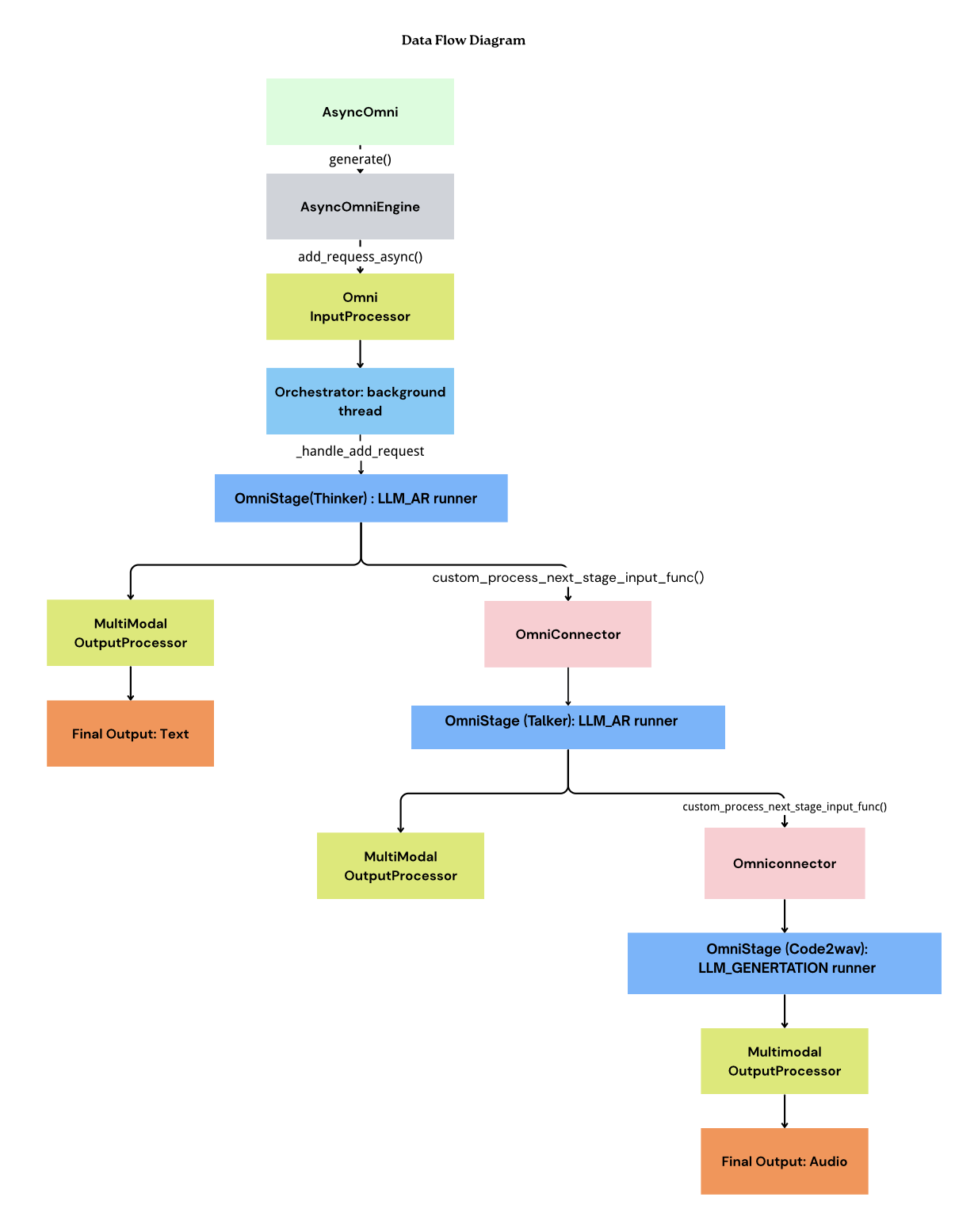
Implementation Example
Create stage transition processors in vllm_omni/model_executor/stage_input_processors/your_model_name.py. Each inter-stage edge should provide a coherent processor set rather than a single monolithic function:
| Suffix | Role | Runs when |
|---|---|---|
*_full_payload | Worker-side payload producer | async_chunk=false; accumulates tensors and ships via connector |
*_async_chunk | Scheduler-side streaming producer | async_chunk=true; emits per-chunk payloads |
*_token_only | Orchestrator placeholder builder | async_chunk=false; allocates downstream prompt slots only |
# qwen3_omni.py (Thinker → Talker, non-async path)

def thinker2talker_token_only(
    source_outputs: list[Any],
    prompt: OmniTokensPrompt | TextPrompt | None = None,
    requires_multimodal_data: bool = False,
    streaming_context: Any | None = None,
) -> list[OmniTokensPrompt]:
    """Allocate talker prefill slots; bulk tensors arrive via the connector."""
    ...


def thinker2talker_full_payload(
    transfer_manager: Any,
    pooling_output: dict[str, Any],
    request: OmniEngineCoreRequest,
) -> dict[str, Any] | None:
    """Pack accumulated thinker hidden states into OmniPayload for stage-1."""
    ...


def thinker2talker_async_chunk(
    transfer_manager: Any,
    multimodal_output: OmniPayload | dict[str, Any],
    request: OmniEngineCoreRequest,
    is_finished: bool = False,
) -> OmniPayloadStruct | None:
    """Stream thinker rows to talker while async_chunk is enabled."""
    ...
Wire these in pipeline.py:
StagePipelineConfig(
    stage_id=0,
    custom_process_next_stage_input_func=f"{_PROC}.thinker2talker_full_payload",
    async_chunk_process_next_stage_input_func=f"{_PROC}.thinker2talker_async_chunk",
    ...
),
StagePipelineConfig(
    stage_id=1,
    sync_process_input_func=f"{_PROC}.thinker2talker_token_only",
    ...
),
Do not add a no-suffix thinker2talker when a sync_process_input_func is already declared — _select_processor_funcs() always prefers the *_token_only hook in non-async mode, so the bare function would never run. See docs/design/rfc_stage_input_processors_refactor.md for the full contract.
Testing
For comprehensive testing guidelines, please refer to the Test File Structure and Style Guide.
Adding a Model Recipe
After implementing and testing your model, please add a model recipe to the vllm-project/recipes repository. This helps other users understand how to use your model with vLLM-Omni.
What to Include
Your recipe should include:
- Model Overview: Brief description of the model and its capabilities
- Installation Instructions: Step-by-step setup instructions including:
- Installing vllm-omni and dependencies
- Installing any additional required packages (e.g., xformers, diffusers)
- Any version requirements
- Usage Examples: Command-line examples demonstrating how to run the model
- Configuration Details: Important configuration parameters and their meanings
Example
For reference, see the LongCat recipe example which demonstrates the expected format and structure.
Recipe Location
Create your recipe file in the appropriate directory structure: - For organization-specific models: OrganizationName/ModelName.md - For general models: ModelName.md
The recipe should be a Markdown file that provides clear, reproducible instructions for users to get started with your model.
Summary
Adding a new model to vLLM-Omni involves:
- Create model directory structure with stage implementations
- Implement unified model class that orchestrates stages
- Register model in
registry.py - Create stage configuration YAML file
- Implement stage input processors for stage transitions
- Write tests to verify functionality
- Add model recipe to the vllm-project/recipes repository (see Adding a Model Recipe section)
Qwen3-Omni Reference Files
For a complete reference implementation, see:
- Main model:
vllm_omni/model_executor/models/qwen3_omni/qwen3_omni.py - Thinker:
vllm_omni/model_executor/models/qwen3_omni/qwen3_omni_moe_thinker.py - Talker:
vllm_omni/model_executor/models/qwen3_omni/qwen3_omni_moe_talker.py - Code2Wav:
vllm_omni/model_executor/models/qwen3_omni/qwen3_omni_code2wav.py - Stage config:
vllm_omni/deploy/qwen3_omni_moe.yaml - Input processors:
vllm_omni/model_executor/stage_input_processors/qwen3_omni.py - Registry:
vllm_omni/model_executor/models/registry.py - Testing:
vllm_omni/tests/e2e/offline_inference/test_qwen3_omni.py
For more information, see: - Architecture Overview - Supported Models - Stage Configuration Guide