
结构化输出指南#
概述#
什么是结构化输出?#
当你需要特定格式输出时,大型语言模型(LLMs)可能表现出不可预测性。比如让模型生成 JSON,如果没有指导,模型可能会生成有效的文本,但这些文本却不符合 JSON 规范。结构化输出(也称为引导解码) 能让大型语言模型生成符合预期结构的输出,同时保留系统的非确定性特性。
简单来说,结构化解码为LLM提供了一个“模板”来遵循。用户提供一个模式来“影响”模型的输出,从而确保输出符合期望的结构。
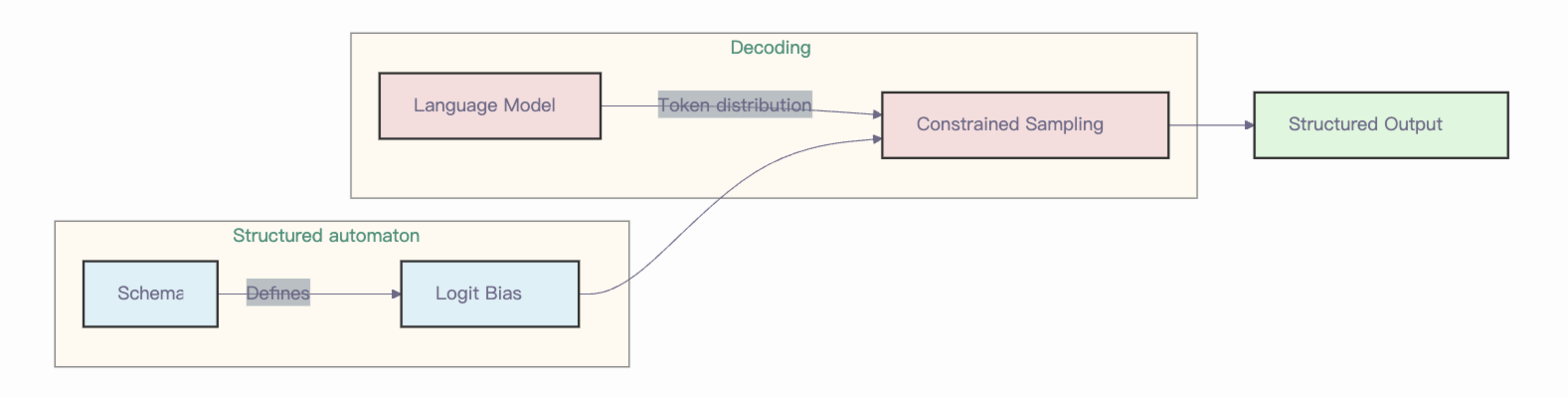
vllm-ascend 中的结构化输出#
目前,vllm-ascend 支持 vllm v1 引擎的结构化输出,后端包括 xgrammar 和 guidance。
XGrammar 引入了一种通过下推自动机(PDA)进行批量约束解码的新技术。你可以把 PDA 理解为“有限状态机(FSM)的集合,每个 FSM 代表一个上下文无关文法(CFG)。” PDA 的一个重要优点是其递归特性,使我们能够执行多次状态转移。此外,PDA 还包含了额外的优化(供感兴趣的用户参考),以减少语法编译的开销。除此之外,你还可以自己找到更多关于指导的信息。
如何使用结构化输出?#
在线推理#
你也可以使用 OpenAI 的 Completions 和 Chat API 生成结构化输出。支持以下参数,这些参数必须作为额外参数添加:
guided_choice:输出将会是其中一个选项。guided_regex:输出将遵循正则表达式模式。guided_json:输出将遵循 JSON 架构。guided_grammar:输出将遵循上下文无关文法。
OpenAI 兼容服务器默认支持结构化输出。你可以通过设置 --guided-decoding-backend 标志为 vllm serve 来指定要使用的后端。默认后端为 auto,它会根据请求的详细信息尝试选择合适的后端。你也可以选择特定的后端,并设置一些选项。
现在让我们来看每种情况的示例,首先是 guided_choice,因为它是最简单的:
from openai import OpenAI
client = OpenAI(
    base_url="http://localhost:8000/v1",
    api_key="-",
)

completion = client.chat.completions.create(
    model="Qwen/Qwen2.5-3B-Instruct",
    messages=[
        {"role": "user", "content": "Classify this sentiment: vLLM is wonderful!"}
    ],
    extra_body={"guided_choice": ["positive", "negative"]},
)
print(completion.choices[0].message.content)
下一个例子展示了如何使用 guided_regex。其思路是基于一个简单的正则表达式模板生成一个电子邮件地址:
completion = client.chat.completions.create(
    model="Qwen/Qwen2.5-3B-Instruct",
    messages=[
        {
            "role": "user",
            "content": "Generate an example email address for Alan Turing, who works in Enigma. End in .com and new line. Example result: [email protected]\n",
        }
    ],
    extra_body={"guided_regex": r"\w+@\w+\.com\n", "stop": ["\n"]},
)
print(completion.choices[0].message.content)
在结构化文本生成中,最相关的特性之一是能够生成具有预定义字段和格式的有效 JSON。为此,我们可以通过两种不同的方式使用 guided_json 参数:
使用 JSON 架构。
定义一个 Pydantic 模型,然后从中提取 JSON Schema。
下一个示例展示了如何将 guided_json 参数与 Pydantic 模型一起使用:
from pydantic import BaseModel
from enum import Enum

class CarType(str, Enum):
    sedan = "sedan"
    suv = "SUV"
    truck = "Truck"
    coupe = "Coupe"

class CarDescription(BaseModel):
    brand: str
    model: str
    car_type: CarType

json_schema = CarDescription.model_json_schema()

completion = client.chat.completions.create(
    model="Qwen/Qwen2.5-3B-Instruct",
    messages=[
        {
            "role": "user",
            "content": "Generate a JSON with the brand, model and car_type of the most iconic car from the 90's",
        }
    ],
    extra_body={"guided_json": json_schema},
)
print(completion.choices[0].message.content)
最后,我们有 guided_grammar 选项,这可能是最难使用的,但它非常强大。它允许我们定义完整的语言,比如 SQL 查询。它通过使用上下文无关的 EBNF 语法来实现。例如,我们可以用它来定义一种简化 SQL 查询的特定格式:
simplified_sql_grammar = """
    root ::= select_statement

    select_statement ::= "SELECT " column " from " table " where " condition

    column ::= "col_1 " | "col_2 "

    table ::= "table_1 " | "table_2 "

    condition ::= column "= " number

    number ::= "1 " | "2 "
"""

completion = client.chat.completions.create(
    model="Qwen/Qwen2.5-3B-Instruct",
    messages=[
        {
            "role": "user",
            "content": "Generate an SQL query to show the 'username' and 'email' from the 'users' table.",
        }
    ],
    extra_body={"guided_grammar": simplified_sql_grammar},
)
print(completion.choices[0].message.content)
在这里可以找到更多示例。
离线推理#
要使用结构化输出,我们需要在 SamplingParams 内通过 GuidedDecodingParams 类配置引导解码。GuidedDecodingParams 中主要可用的选项有:
json
正则表达式
选择
语法
choice 参数用法的一个示例如下:
import os
os.environ["VLLM_USE_V1"] = "1"

from vllm import LLM, SamplingParams
from vllm.sampling_params import GuidedDecodingParams

llm = LLM(model="Qwen/Qwen2.5-7B-Instruct",
          guided_decoding_backend="xgrammar")

guided_decoding_params = GuidedDecodingParams(choice=["Positive", "Negative"])
sampling_params = SamplingParams(guided_decoding=guided_decoding_params)
outputs = llm.generate(
    prompts="Classify this sentiment: vLLM is wonderful!",
    sampling_params=sampling_params,
)
print(outputs[0].outputs[0].text)
查看更多其他用法的示例 在这里。