AI QoS 特性
背景
在推理场景中,存在不同类型的流量,例如算子下发、集合通信和 KVCache。这些流量通过网络传输并相互影响,从而增加推理延迟。
例如,在 Agentic AI 时代,随着上下文长度不断增加,KVCache 的大小也逐渐增长。为了节省 HBM 使用,采用将 KVCache 卸载到 DDR 的方法来提升推理 TPS。同时,为了最大化算力利用率,通常采用计算掩盖 KVCache 的流水线编排方法。该方法在当前层的计算/通信期间预取下一层的 KVCache,以减少整体延迟。然而,这种方法引入了 KVCache 与算子下发/集合通信之间的流量冲突问题,导致推理延迟增加并影响 SLO。
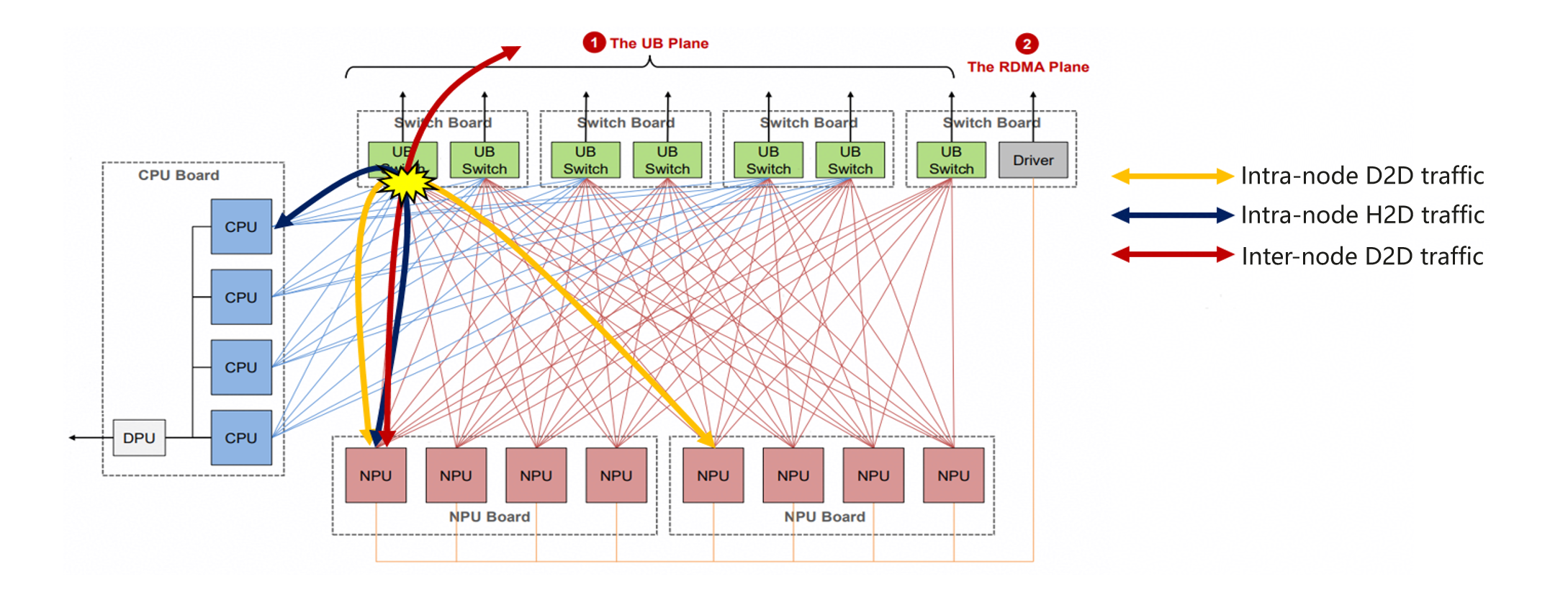
如上图所示,当节点内设备到设备(D2D)流量、节点内主机到设备(H2D)流量以及跨节点 D2D 流量传输时,UB 交换机上会发生流量冲突。
简介
当不同类型的流量相互冲突时,可以使用虚拟通道(VL)在 UB 交换机上隔离流量,并在 VL 之间进行差异化调度。这有助于:(1) 隔离不同类型流量的 VL,防止拥塞扩散;(2) 对不同类型的流量进行差异化调度。
如下图所示,不同类型的流量被映射到不同的 VL 以隔离流量。此外,设置每个 VL 的优先级并使用严格优先级(SP)调度模式。当不同类型的流量同时到达 UB 交换机时,高优先级 VL 中的流量首先被调度,然后是中等优先级 VL 中的流量。此过程重复进行,直到所有流量都被调度。通过这种方式,实现了对不同类型流量的差异化调度。
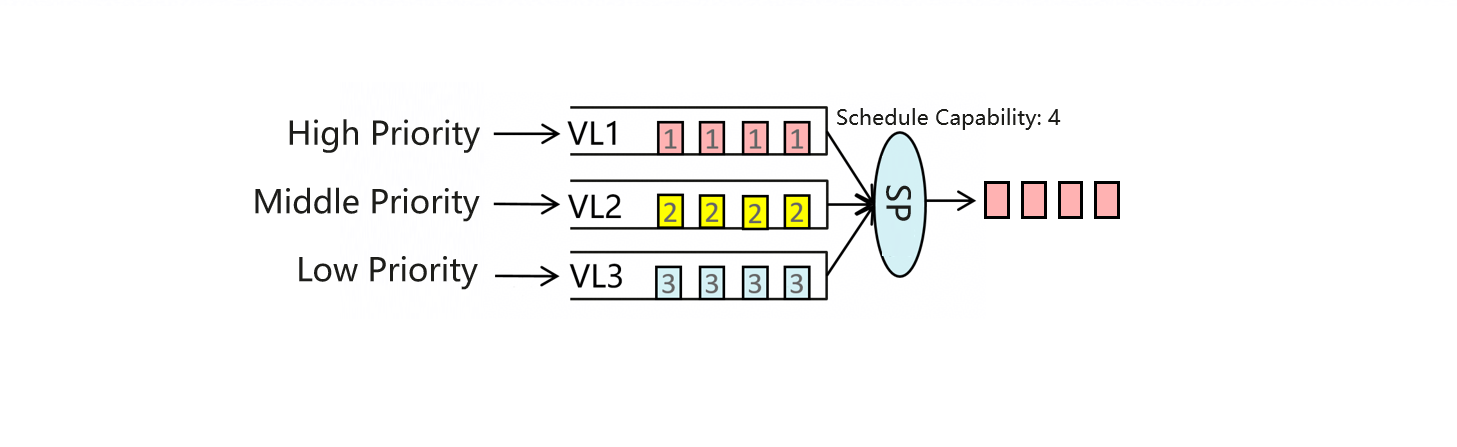
不同的流量通过不同的通道传输。因此,AI QoS 解决方案通过以下方式实现不同流量的隔离和差异化调度以满足业务需求:(1) 在主机上为不同的 NPU 通道设置优先级,(2) 建立 NPU 通道优先级与 UB 交换机 VL 之间的映射,(3) 基于优先级在 UB 交换机的不同 VL 之间执行差异化调度。
构建 AI QoS 模块
在使用 tools/ai_qos.py 之前,请先构建并安装 AI QoS 扩展。
DSMI 头文件(dsmi_common_interface.h)和库文件(libdrvdsmi_host.so)的路径取决于环境。请先找到您机器上的路径,然后将命令中的 YOUR_DSMI_INCLUDE_DIR 和 YOUR_DSMI_LIBRARY_FILE 替换为实际路径(例如 /usr/local/Ascend/driver/include 和 /usr/local/Ascend/driver/lib64/driver/libdrvdsmi_host.so)。
在大多数部署中,这些命令在容器内执行。创建容器时,请确保 DSMI 头文件/库目录已挂载到容器文件系统中;否则 CMake 无法找到这些文件。
在 vLLM-Ascend 仓库根目录下运行以下命令:
cmake -S tools/ai_qos -B tools/ai_qos/build \
  -DCMAKE_BUILD_TYPE=Release \
  -DCMAKE_INSTALL_PREFIX=${PWD}/vllm_ascend \
  -DDSMI_INCLUDE_DIR=YOUR_DSMI_INCLUDE_DIR \
  -DDSMI_LIBRARY=YOUR_DSMI_LIBRARY_FILE
cmake --build tools/ai_qos/build -j
cmake --install tools/ai_qos/build
使用说明
AI QoS 特性支持两种模式:自动和手动。进入 vLLM-Ascend 安装目录,在运行推理任务前执行以下命令:
1) 自动模式
python tools/ai_qos.py
AI QoS 自动模式自动对不同类型流量的优先级进行分类并生成 QoS 标签。它还会打印 UB 交换机配置。您可以复制输出并登录到 UB 交换机来配置 UB 交换机的 QoS 配置。此配置将覆盖 UB 交换机上当前的 QoS 配置。如果存在任何现有的 QoS 配置,请提前备份。
2) 手动模式
python tools/ai_qos.py --mode manual --AIV_D2D {priority} --AIV_H2D {priority} --SDMA_D2D {priority} --SDMA_H2D {priority} --PCIEDMA_H2D {priority}
AI QoS 手动模式根据用户设置的不同类型流量的优先级计算流量的 QoS 标签,并生成和打印 UB 交换机配置。您可以复制输出并登录到 UB 交换机来配置 UB 交换机的 QoS 配置。此配置将覆盖 UB 交换机上当前的 QoS 配置。如果存在任何现有的 QoS 配置,请提前备份。
在手动模式下,您只能指定一种类型流量的优先级。参数说明如下:
| 名称 | 类型 | 默认值 | 描述 |
|---|---|---|---|
| mode | str | auto | AI QoS 的模式,默认模式为 "auto",另一种模式为 "manual",若选择 "manual" 模式,则需要配置部分参数。 |
| AIV_D2D、AIV_H2D、SDMA_D2D、SDMA_H2D、PCIEDMA_H2D | str | AIV_D2D: high, AIV_H2D: high, SDMA_D2D: high, SDMA_H2D: low, PCIEDMA_H2D: high |
"manual" 模式的参数,决定不同类型流量的 QoS 优先级。 默认配置与 "auto" 模式相同。 典型流量类型如下供参考: AIV_D2D:基于 AIV 的设备间通信,例如 dispatch 和 combine。 AIV_H2D:基于 AIV 的算子下发。 SDMA_D2D:基于 SDMA 的设备间通信,例如 Allreduce 和 Allgather。 SDMA_H2D:基于 SDMA 的主机到设备/设备到主机通信,例如 KVCache 卸载和预取。 PCIEDMA_H2D:基于 PCIe DMA 的算子下发。 您可以更改不同类型流量的优先级,可选 "high/middle/low"。由于硬件限制,"PCIEDMA_H2D" 仅支持 "high/low" 优先级。 |
如何禁用 AI QoS:
禁用 UB Switch 上 AI QoS 功能的命令将打印在屏幕上。请登录 UB Switch 并执行屏幕上打印的命令以完成功能禁用。
使用约束
由于底层驱动限制,AIV_H2D 和 AIV_D2D 的 QoS 配置当前不生效。待未来驱动版本增加所需适配能力后,此功能将通过模块升级交付。
AI QoS 功能支持 Atlas 800T A3 服务器和 Atlas 900 A3 SuperPoD 集群。必须在特权容器中使用,并需要以下软件版本:
| 软件 | 匹配版本 |
|---|---|
| Ascend HDK | 25.5.2 或更高版本 |
| UB Switch | 灵衢计算网络 1.5.1 或更高版本 |